
SoterAI dashboards for insurance
Build client-ready dashboards yourself. No BI tool, contractor or IT ticket.
Brokers and carriers connect their claims or agency management system, or upload a loss run, a policy or a survey, and get an interactive dashboard, tracker or client deliverable they can refine in chat and share by link. Start with the job that is on your desk this week.
What this replaces
Build it yourself.
A dashboard used to be a request to someone else. Now it is something you make, in the time it takes to ask.
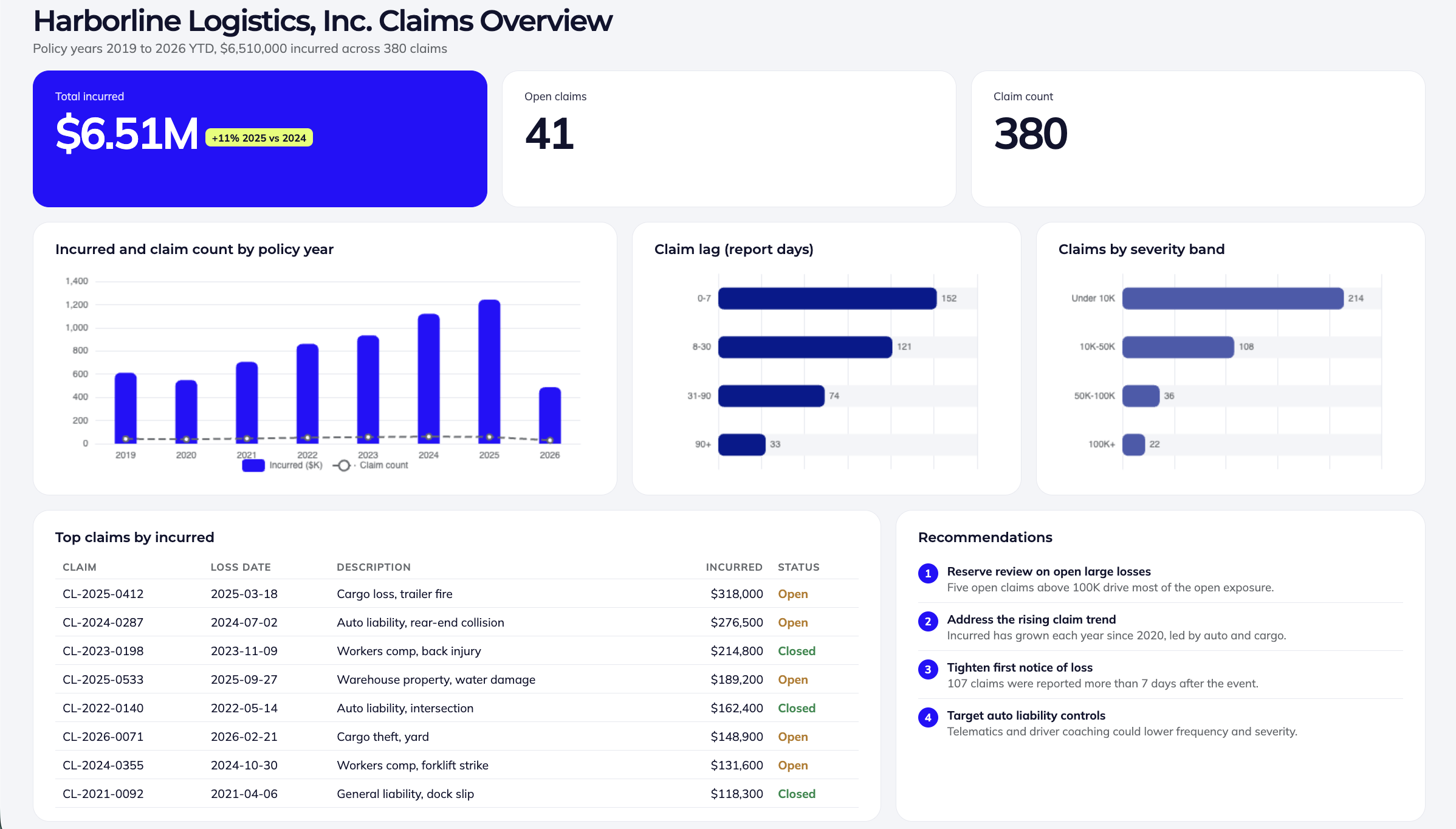
The loss run on your desk becomes the client dashboard before the meeting.
No more BI tools.
No licenses to buy, no data model to set up, no report builder to learn. You describe the dashboard and SoterAI builds it.
No more contractors.
No briefing an agency or a freelancer, no waiting on a quote, no paying again for every change. You change it by asking.
No more IT tickets.
No queue behind the data team. Connect your platform or upload an export and watch the first version build.
By job
Start with the job on your desk.
Loss run to claims dashboard
Upload any carrier's loss run. Get trends, lag, severity, top claims and recommendations for the client meeting.
Bring
- A connection to your claims system or agency management system
- Carrier and TPA loss runs, as you received them
- Workers' comp, general liability, auto and property runs
- Prior-year runs, for the trend
- EMR worksheets and loss allocation sheets
Teams build
- Loss run dashboards, one per client
- Workers' comp trend reviews
- Claim lag and severity views
- Top-claims views
- EMR and loss allocation
- Claim review trackers
Ask
“Build a dashboard from this loss run.”
Client risk reviews
Risk profiles, recommendation trackers and stewardship reports for each client workspace.
Bring
- A connection to your agency management system, for client records and loss data
- An export of client records and loss data, as a spreadsheet or CSV
- Site visit and survey notes
- Loss runs and claim summaries
- Last review's recommendations
- Benchmark data for the client's class
Teams build
- Client risk profiles and briefings
- Stewardship reports
- Recommendation trackers
- Site visit and survey findings
- Benchmarking against peers
Ask
“Build a client risk profile from these site visit notes and the last three loss runs.”
Loss-control deliverables
Checklists, toolbox talks and training material tailored to a client's trade and state.
Bring
- A connection to your loss-control or client records system
- An export of the client's loss data, as a spreadsheet or CSV
- A short description of the client's trade and operations
- The loss run or incident summary that shows the hazards
- The state the work happens in
- The client's existing safety program, if there is one
Teams build
- Checklists
- Toolbox talk libraries
- Training decks
- OSHA and ergonomics guides
- Webinar flyers
Ask
“Build a site safety checklist for a paving contractor in Texas.”
Coverage and proposal comparison
Side-by-side policies, quotes and TPA proposals, excess tower diagrams and renewal timelines.
Bring
- A connection to your agency management system, for policies and renewal dates
- An export of policies and renewal dates, as a spreadsheet or CSV
- Policy forms and quotes
- TPA and carrier proposals
- Expiring terms and renewal dates
- Captive program summaries and excess layers
Teams build
- Policy and quote comparisons
- Excess tower diagrams
- TPA proposal comparisons
- Renewal timelines
- Captive summaries
Ask
“Compare these three TPA proposals on pricing, service model and claims handling.”
Fleet and DOT safety dashboards
Repeatable motor carrier and fleet KPI dashboards, one per client.
Bring
- A connection to your telematics or fleet platform
- Telematics alert exports
- Driver lists and violation records
- Motor carrier safety reports and scores
- Fleet loss runs
Teams build
- Fleet safety KPI dashboards
- Motor carrier safety scores
- Driver scoring
- DOT compliance roadmaps
- Telematics alerts
Ask
“Build a fleet safety KPI dashboard from this telematics export.”
Property and engineering risk views
Portfolio views of engineering reports and location risk, including maps.
Bring
- A connection to your policy or location schedule system
- An export of your location schedule, as a spreadsheet or CSV
- Engineering and survey reports
- Statements of values and location schedules
- Hazard and catastrophe data by site
- Recommendation lists from prior surveys
Teams build
- Property visualization tools
- Engineering report portfolios
- Hurricane and jurisdiction maps
- Location risk tables
Ask
“Map these locations by total insured value and flood zone.”
Team capacity and service tracking
For practice leaders: who is working on which client, and what was delivered.
Bring
- A connection to your management system, for assignments, time and revenue
- An export of assignments, time and revenue, as a spreadsheet or CSV
- Assignment and staffing sheets
- Time, revenue or billing exports
- Delivery logs and client service calendars
- Pipeline or prospect lists
Teams build
- Consultant capacity
- Client service trackers
- Revenue and assignment views
- Email triage
- Prospecting views
Ask
“Show consultant capacity for next quarter from this assignment sheet.”
How it works
Connect it. Ask for it. Refine it. Share it.
Connect
Connect the platform you already use, or upload an export from it. A loss run, a standard or a spreadsheet works too. No cleanup, no template.
Ask
Say what you need in a sentence or two, and who it is for. SoterAI builds it in a side panel while you watch.
Refine
Change anything by asking: swap a chart, add a filter, reword a recommendation, match your colors. Most dashboards take a handful of messages.
Share
Keep it in your workspace, or create a link for your client, your leadership or your site teams.
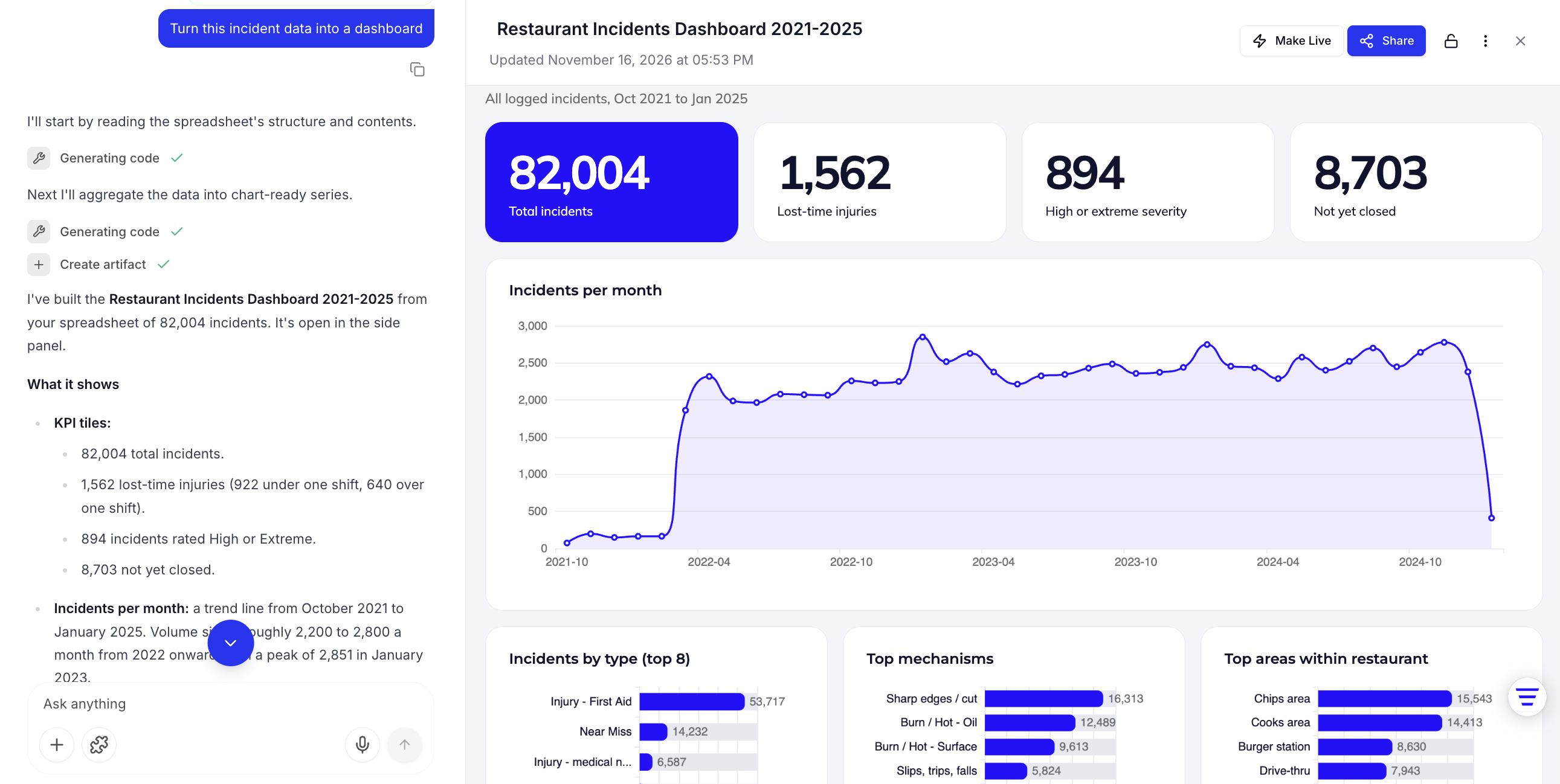
The working view: your file and the conversation on the left, the dashboard on the right.
Not only charts
Plenty of what people build is not a chart.
- Dashboards
- Checklists
- Posters
- Slides
- Calculators
- Forms
- Maps
- Guides
Frequently asked questions.
Pick the job. Bring the data.
Tell us which of these is on your desk this quarter and we will build the first one with you.
Tell us the team you are on and the data you work with, and we will plan the first SoterAI build with you.
Talk to our team
Loading form...